Clients don’t need to see everything – and frankly, they shouldn’t.
If you manage WordPress sites for clients, you’ve probably been asked:
“What’s this?”
“Can I delete this?”
“Why does this plugin say it needs updating?”A client
The WordPress admin menu is powerful, but often too powerful, especially for non-technical users. It’s easy to overwhelm clients with options they don’t need (or shouldn’t touch).
In this article, you’ll learn:
- Why it’s important to hide admin menu items in WordPress
- The common plugin-based approaches (and their downsides)
- A faster, lighter way using Agency Turbo
Why Hide WordPress Menu Items?
Most clients only need access to a few things: maybe Posts, Pages, Media, your page builder of choice (if you swing that way) and a few trusted tools.
But WordPress doesn’t know that. It gives users access to everything their role allows, which often means:
- Confusing interfaces
- Accidental misconfigurations
- Support tickets for things that didn’t need to happen
Hiding admin menu items helps create a focused, client-friendly experience that feels more professional and less overwhelming.
The Problem With Most “Menu Manager” Plugins
There are many WordPress plugins that let you control admin menus, but they often come at a cost:
- Feature overkill (menus, widgets, capabilities, redirects… all in one)
- Heavy codebases that slow down your admin
- Complex settings panels that clients could still access
- Permission conflicts
All of that just to hide a few menu items? That’s not ideal. Especially at scale.
A Leaner Way to Control Menu Visibility
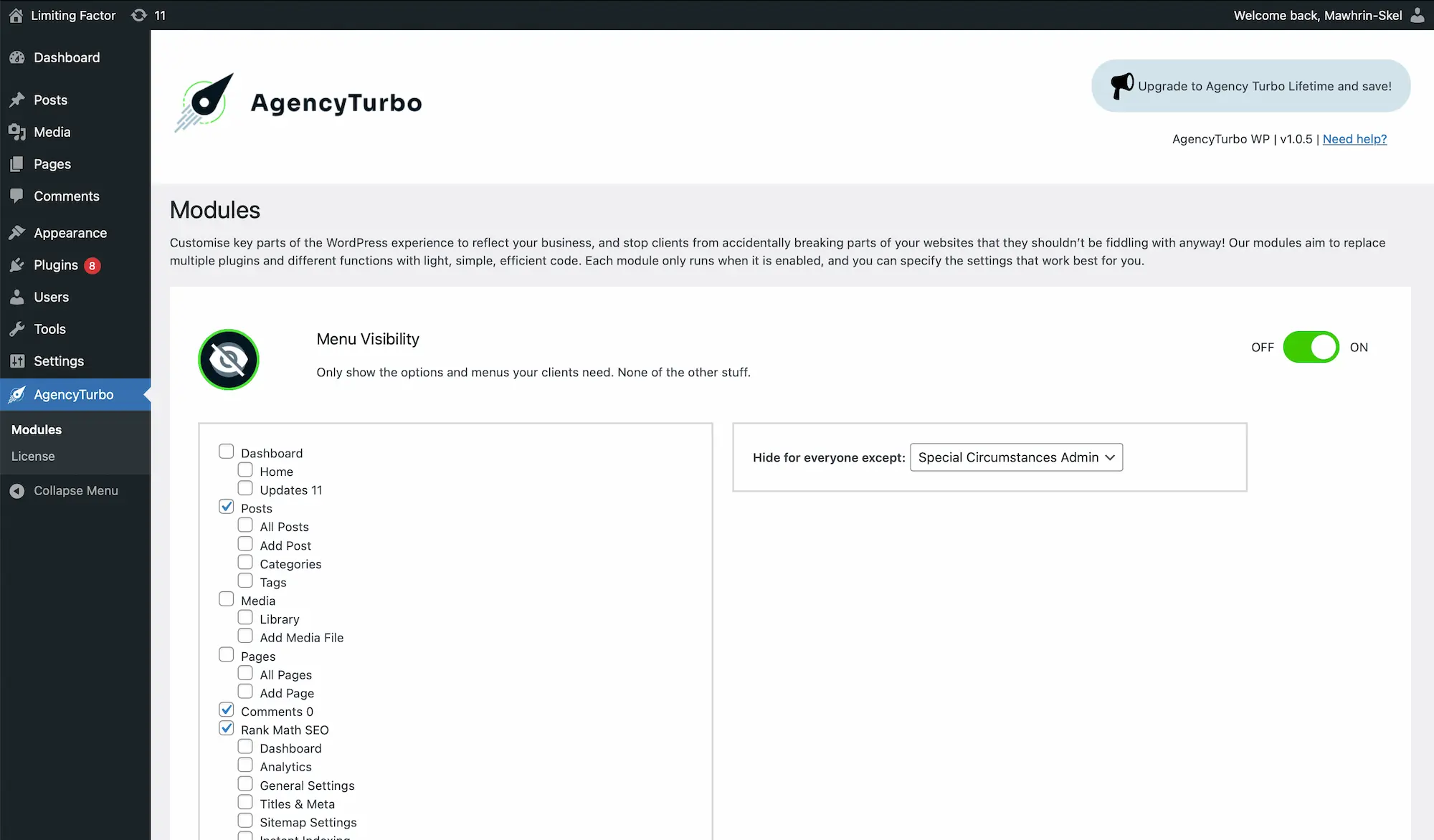
Agency Turbo offers a simpler solution: a lightweight module that lets you quickly and cleanly hide admin menu items in WordPress – with no extra cruft.
Features include:
- Selectively hide menus by user role (integrates perfectly with our Agency Admin feature)
- Prevent access to sensitive areas like Plugins, Tools, or Settings
- Keep the admin area clean and non-threatening for clients
Because it’s modular, you only activate what you need so your dashboard stays fast and focused.
Agency Admin
Want tighter access control? Read how to create an agency-only admin role in WordPress.
Hide Notifications
Need to reduce admin clutter further? Learn how to hide WordPress notifications and nags.
When and Where to Use Menu Restrictions
Menu visibility is useful in several scenarios:
- Handing off a completed site to a non-technical client
- Providing limited access to editors, interns, or contributors
- Managing multisite installs with specific access needs
In every case, your goal is the same: reduce friction, reduce mistakes, and make the site feel like it was built with the user in mind. Because hopefully, it was.
Conclusion
You shouldn’t need a Swiss Army knife plugin just to hide admin menu items in WordPress.
With Agency Turbo’s Menu Visibility module, you can give clients exactly what they need, and nothing they don’t.
✅ Ready to declutter your WordPress admin? Get started with Agency Turbo today.